Explanation: There are 6 layouts in total. Colorwise however "thin", "wide" "clas" are all the same. Easy and Hiking are only slightly different. They only differ in the width of the lines to best match the different GPS. The mapsource/Qlandkarte GT layout (referred to as "trad" from now on) however has different colors, with less contrast. Therefore in this mag legend for Polylines (Highways) there are always two examples. One using the "trad" layout (on the top), and one using the "clas" layout below). Please note, as this question often pops up, many variables like tracktype are just munged together from other keys like smoothness or surface. If you want to know what is the primary factor please read the sourcecode of the style-file (see FAQ). Thin, Classic or Wide? This choice exists only for the standard layout. It depends on your device DPI which to choose. Thin has the thinnest lines - it is suited for older low DPI Garmin GPS devices. (60CSx, Dakota). Classic is in the middle (similar width to easy, trad (desktop) and hiking layout) - it is suited for devices like Vista HCx, Etrex 20/30, edge 705. Wide layout has the widest lines - it is for high DPI devices like Oregon, etrex 30x, Colorado, or edge 1000. Most Garmin devices presented 2015 or later fall in that category. Because traditionally the high DPI devices had lower contrast - the Wide layout has highest contrast. It looks pretty bad on desktop use though. Quick guide to the colors used for ways and tracks: Red=tracks which are wide enough for a car to pass. Unpaved - the smaller/more dottet the segments of the line are - the worse/less even the surface. Black/Grey/: Cycleway or paved track. Green: Singletrail / small trail with mtb classification (mtb:scale) - from 0 easy to 5 (good trial skill needed) - again the smaller the segments - the more difficult Brown: Path - usually rated according to the Swiss Alpine Club hiking trail classification. Again - the smaller the segments - the more difficult. In general for brown/red/ ways: If a way is not rated for difficulty - it will be shown as continuous line. Ways with mtb attributes or sac_scale (clickable thumbnails for full size) Additional ways and lines (clickable thumbnails for full size) Restaurants and Shopping Sport and Tourism Municipal and other POI Landuses: Sport and Public Places: Natural and Tourism M12 / Mn34 -- the first number is the mtb:scale, the second number the mtb:scale:uphill. "n" stands for the way being part of a mtb route/network. See:http://wiki.openstreetmap.org/wiki/Key:mtb:scale Note however - that I also map the keys smoothness and surface to tracktype G value. So I try to get the best value - also if it may contradict with the actual value for tracktype. T2 -- sac_scale=T2 (mountain hiking) See: http://wiki.openstreetmap.org/wiki/Key:sac_scale Tv6=Trail_Visibility (6=no, 5=horrible,4=bad,3=intermediate) https://wiki.openstreetmap.org/wiki/Key:trail_visibility Xbk --bicycle=no Routes Differentiated by importance as follows (for Mountain Bike Routes as example) - if classified. If not it`s simply Mr. Rmn34 would be = Regional Mountainbike Route, mtb:scale=3, mtb:scale:uphill=4 Lmn3. = Local Mountain Bike Route, mtb:scale=3, mtb:scale:uphill=unknown. Highways See: http://wiki.openstreetmap.org/wiki/Key:highway Pri=primary / primary_link Cyclelane/Cycletrack See: http://wiki.openstreetmap.org/wiki/Key:cycleway Bklane=cycleway=lane Note: the first letter is always capital - I dropped proper usage of small/capital letters because it creates problems on quite a few older Garmin devices.
The OpenMTBMaps and VeloMaps come with several different layouts/styles (also known as .typ-files) There are three main categories: a) the default layouts - Classic/Classic_Legacy/Wide/Wide_Legacy/Easy/Hiking/Winter/Fenix The legacy layouts feature the german highway colours (blue/green/red/yellow/white) while the other layouts colour streets from orange/yellow to white similar to google maps. They are all high contrast because they are intended to be used on small screens and with varying levels of sun/shade. On a desktop/laptop sized display they do not look so nice - but enable very quick distinction between kinds of streets or pathes. b) The desktop layout - (trad/trdn) This is a low contrast layout only to be used on desktop/laptops - on your GPS device the lower contrast will make it harder to read (only useful if you want to have better contrast for tracks or routes) So below screenshots of all layouts on a desktop to show the difference: The classic Layout. The only difference to the wide layout is the thinner streets. Optimal for lower DPI garmin devices. The Classic legacy - notice the different colours of the main streets/highways. The Wide layout - same as classic but all lines are wider - for higher DPI devices The Wide legacy - again different main street colours The easy layout - it doesn't include things like cyclelanes/cycletracks that run parralel to other roads, or mtb:scale:uphill difficulty. Otherwise identical to Wide. The hiking Layout - more details about the difference on the MTB specific screenshot in the next section. The pathes are not colored according to MTB difficulty but according to hiking difficulty. It does not show cycling routes and mtb routes but only very thin so if you want to avoid mtb routes you can, walking, foot routes are shown prominently. Also of course no other mountainbike/cycling specific information. The Simple Topographical map layout - it is more simplified vs the hiking layout . Also it shows hiking, mtb, and cycling routes all only very thin/not prominent. For example there is no differentiation between highway=track / highway=service & tracktype=grade1/tarmac and highway=residential roads. The Desktop layout - the colors and features/objects are similar to Wide but it has much less contrast. So it is much more pleasing to the eye on a big screen. However on your GPS device it will be much harder to read. You can use it if you always follow tracks (not routes) and want them to pop out more. The winter layout - same as easy but additonaly shows sledge trails, nordic skiing trails and so on. Normal ski-slopes are also visible in the other layouts as they exist all year round. This layout has many things that are only visible in winter. The Fenix layout - this is here only for completion - it uses the best colours for the 64 colour display of the Fenix 5/6/7 series - however note on your watch they will look quite differently to the screenshot here. The features shown are a bit reduced as the display size is very small so to show the most important things for mtb / cycling only. It has very wide lines Notice the dashed lines showing Nordic skiing slopes in Ramsau am Dachstein which is famous for nordic skiing. Also shows sledge trails or some more features that are only visible in winter and removed for summer. Ski Slopes are usually well visible in summer too so visible in all openmtbmap layouts. The blue dots for example are winter hiking trails - only existing in winter (usually a groomed trail on a field). An example to show the difference of the Hiking layout not showing features for mtbikers to make the map easier but also usable for hikers. First the wide layout with all features for mtbiking now the a bit reduced easy layout (notice the mtb:scale:uphill information is missing) now the Hiking layout (hiking routes are black dashed): OpenMTBMap Standard features layout (as on Wide layout) - vs the Easy layout - and later VeloMap inner city example vs the easy layout missing the blue arrows for against oneway cyclelane on the center road. Also the living streets is shown as a normal residential street in the easy layout - I left out some not so important features and simplified them. Also the POI are less visible for shops and restaurants uncluttering the map. VeloMap Wide layout - nearly identical inside the city to the OpenMTBMap wide layout. The big difference to the OpenMTBMap is that some footways/pathes that are likely not allowed to be cycled, or not good surface are only shown very thinly. So better for commuting/riding fast. This is of course much more distinct if in some forest/mountain. Note it also misses the cycle route, that is because I used an older map for this screenshot when the cycle route was not yet built/present in Openstreetmap. The VeloMap Wide Easy Layout - same as the OpenMTBMap Easy layout - removed the cyclelanes/cycletracks parallel to roads, and simplified some things like living streets. The VeloMap Racing / Road Bike Layout - the difference will be more visible outside cities to the easy layout. - note previously it did not show buildings. I re included them because you now can remove the buildings alltogether (do not install them, or use the gmapsupp.img downloads instead of sending via MapInstall) The Velo Layout - thinner lines for low DPI devices. Street colours similar to google maps (though a bit more orange/red to still see differences in size of streets) The Velo Legacy Layout - Germany style street colours for very easy differentiation of the main streets. Same width as Velo. The Velo Wide Layout - same as Velo but wider streets for newer/higher DPI Garmin devices Wide Easy Layout - does not include cycletracks or cyclelanes that are parallel to streets and some more for most not important things. Look further down to the Inner City section to see the actual difference. The Road Bike / Racing layout - this leaves out many things not interesting for a road biker to quicker identify the streets useful for road biking. Note that if you do not want the buildings - then leave out the buildings layer (buildings add too much clutter for road biking in my opinion) The Simple Topo - Simple Topographical map layout. It is simplified to not show any information that a normal topographical map would also not show. So for example highway=track & tracktype=grade 1 (tarmac) is shown the same as highway=residential. Service roads are also shown like residential roads. It's the easiest to understand and get used layout. Cycle routes are only shown thinly - not prominently like in other layouts. The Desktop Layout - Same as Wide but much less contrast. This is much nicer to look at on big screens / desktop but not very useful on your Garmin GPS device - except if you want the map to be low contrast to have higher contrast for the pink colour of the GPX tracks. The Fenix Layout - heavily reduced and colour adapted layout for the small displays of Fenix 5/6/7 watches which can only show 64 colours. It looks actually a bit different on your watch than the screenshot - though also differs a lot due to angle/sun/backlight Sometimes people ask me should I use OpenMTBMap or VeloMap - let's put it clearly. If you are commuting or road biking or recreational cycling the VeloMap is much quicker and easier to read - because it has way less information. Here I show an example without contourlines and without buildings. If you want to hike or mtbike you need more information, you want more prominent trails so the map becomes more complicated to read. For Gravel I think in general the OpenMTBMap is more useful. For riding a trekking bike because you frequently have bad surface quality - but you prefer good surface over gravel roads just not huge roads with cars - the VeloMap will usually be better. vs the much simpler VeloMap - both wide layout. Note you can add the buildings and contourlines to the VeloMap.
Polylines (Highways):
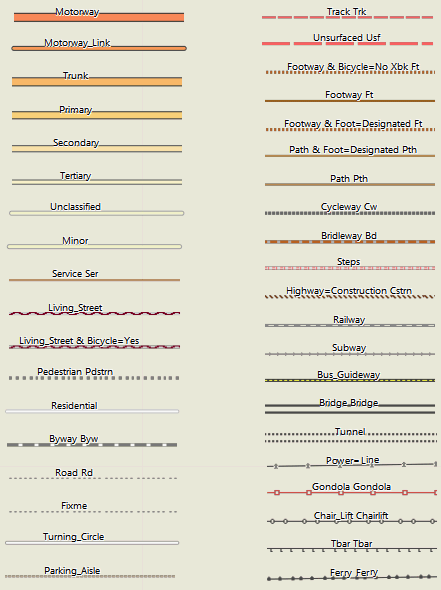
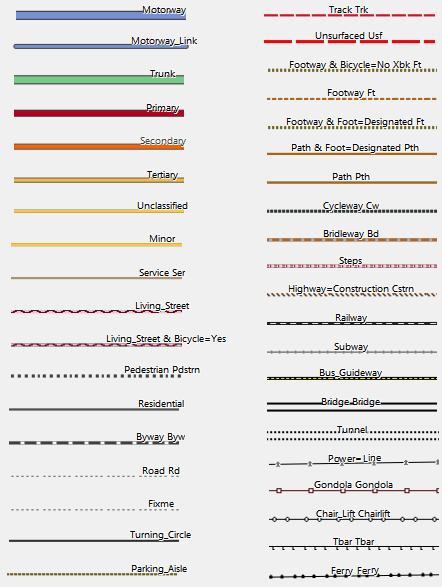
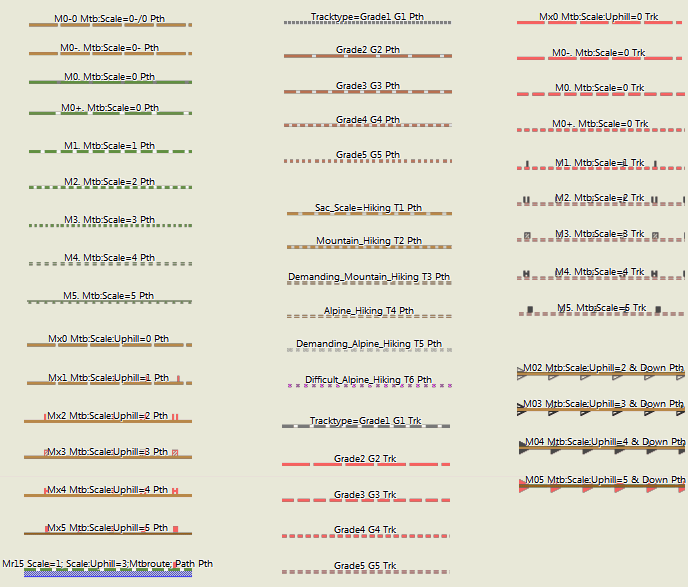
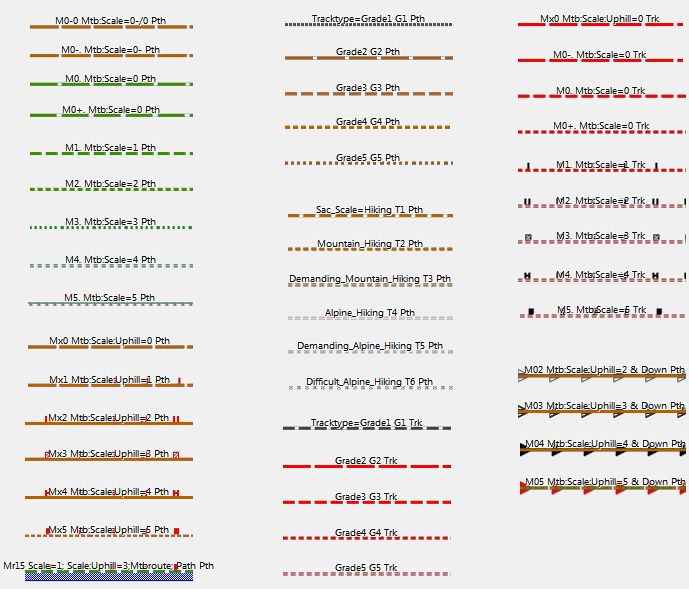
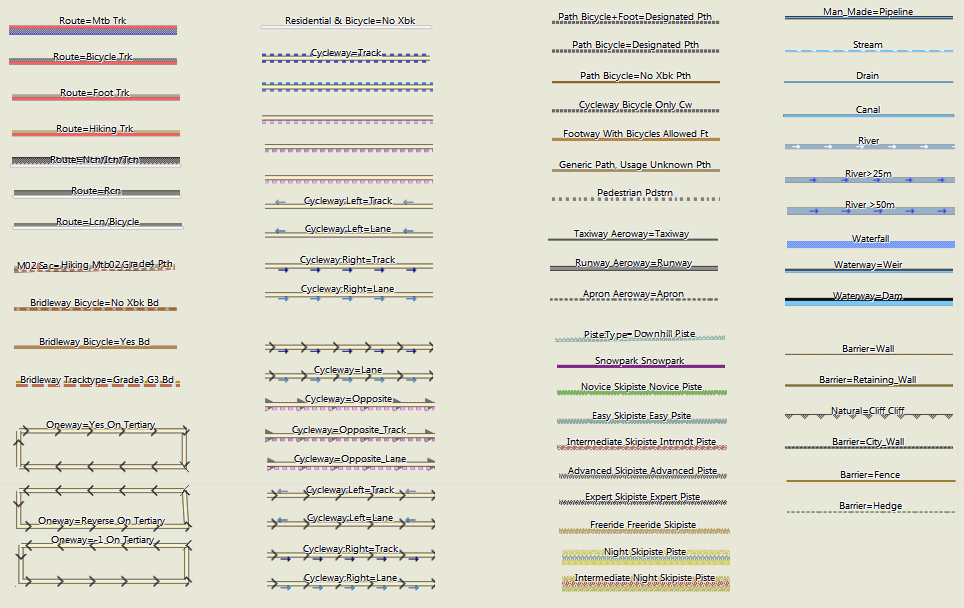
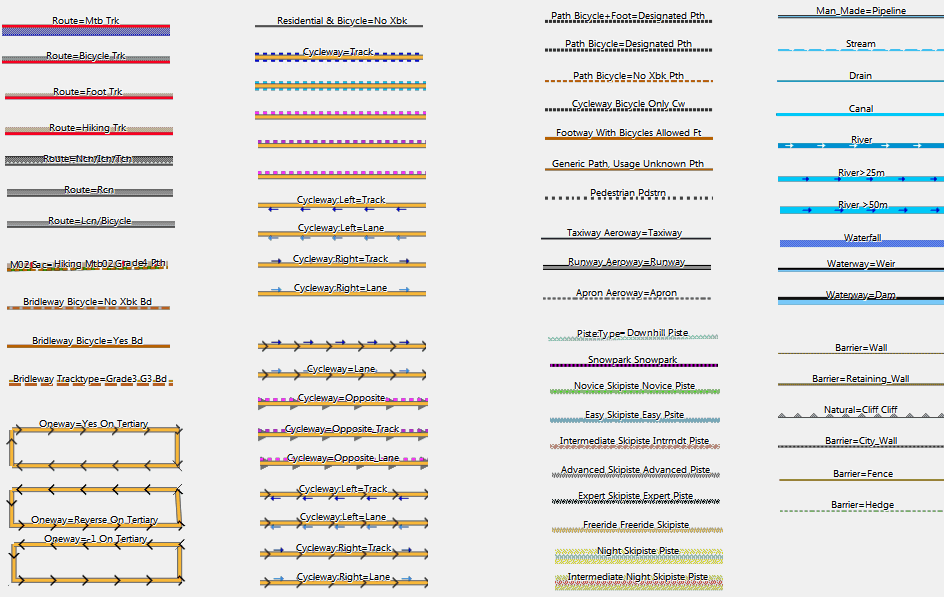
Points of Interest

Areas
Abbreviations and Highway Attributes:
G1 -- tracktype=grade1 See: http://wiki.openstreetmap.org/wiki/Tracktype
See: http://wiki.openstreetmap.org/wiki/relation:route
Sec=secondary
Ter=tertiary
Cw=cycleway
Min=minor
Unsf=unsurfaced
Uncl=unclassified
Living=living_street
Pdstrn=pedestrian
Trk=track
Pth=path
Ft=footway
Fp=footpath
Brdlw=bridleway
Rd=road
Byw=byway
Ser=service
Bktrk - cycleway=track
Opp - cycleway=opposite
Opptrk - cycleway=opposite_track
Map Legend GeneralMap Layout/Style
Hi,
I have uploaded my MTB Sri Lanka map to my Montana 700 but all the tracks asre coloured light grey.
In Basecamp where I plan the routes they are coloured though.
What should I do? How can I get this as well on my Montana?
Thank you for helping out!
The colour information is not stored in the track. I’m not sure if there is a way to change the colour of tracks on the Montana 700. When you activte a track for routing – it will be shown more prominently. On garmin edge devices there is an xml file which can be edited that defines the colours of tracks, routes, overlays, climb pro and so on.
This is how it looks on my Montana 700. The (secondary) roads are coloured yellow, but the unpaved (MTB) tracks are all light grey / light grey dotted while in basecamp these are marked red.
Maybe there is now also a contrast mode vs classic map mode on Montana 700? Or what you see is something like climbpro?
Changing the layout of the map is done differently depending on how you send the Maps to the device. If with map install it should be very similar to Basecamp (not exactly as Basecamp does anti-aliasing which the devices cannot do usually)
ah or you mean tracks inside the map (not gpx tracks). you can change the layout of the maps – here are the different layouts: https://openmtbmap.org/about-2/map-legend/
Yes, indeed I mean the colours of tracks on the map.
I understand I can change it, I just don’t know how?
Never had this issue before, and I make use of your maps for a while already (although not an expert at all 😉
Thank you for the great work you do! 🙂
I’m super happy about being able to easily get OSM maps on my Garmin, I had given up years ago messing around with MapWel and all the workflow.
I’m curious about the trail styling though, I tried the default wide and the hiking style and there’s this weird effect making the trails much wider than they need to be, almost like there’s a drop shadow that my Garmin GPSMAP64 doesn’t properly support?
what you see in this screenshot is the indication for a mtb route (or a hiking route if that*s the hiking layout). I highlight bicycle, mtb, and hiking/foot routes like this depending on the layout.
Same issue. I updated maps after a lot of time and I found this red, really too big red shadows on a Garmin GPSMap 64. In areas with a lot of paths there red fat hilights/shadows make the display so confusing. Since now I am using a Mac I am not able to switch to a different layout. Do you have any hints to switch to a better and more readable layout?
you can also switch the layouts on Mac ´- not for gmapsupp.img files but for installed maps with Basecamp you can replace the layout. On the 64 you really should use the clas(sic) layout. The wide is too wide.
Thank you, now the lauout is again OK! 😀
Ich habe gerade nach zwei Jahren oder so mal wieder meine Karten auf meinem Oregon aktualisiert (mit den Premium gmapsupp Downloads wie immer). Dabei ist mir aufgefallen, dass jetzt plötzlich diverse Wald-/Feldwege, die vorher rot/weiß gestrichelt waren, plötzlich rot/grau oder rot/dunkelgrau gestrichelt sind… hat sich da irgendwann mal etwas geändert?
Ich fand rot gestrichelt mit weiß als Unterbrechung besser als mit grau – die grauen Unterbrechungen der roten Linien sind weit schlechter zu erkennen als weiße. Ich hab schon verschiedene TYP-Files probiert, ist aber offenbar überall genauso. Hat das einen Grund, warum das anders ist?
Ich habe vor gut 1.5 Jahren die Farben leicht geändert – damit der Unterschied der Tracktypes besser erkennbar ist.
Danke für die Antwort!
Hmm, schade – dann muss ich mir wohl eigene TYP-Files bauen. Siehe Screenshot – bei kurzem Draufschauen sind die roten unterbrochenen Feldwege kaum unterscheidbar. Als zwischen den roten Liniensegmenten weiße Unterbrechungen waren, war das sofort sichbar, ob es nun ein G2 Trk oder ein G3 Trk war (oder gepunktet dann G4 Trk usw).
Je nach GPS Gerät hat der alte Linienstil mit einer Linie außen und weiß innen bei Drehung gröbere Probleme gemacht (bei Grade 4/5 genutzt) – und die Linien sind quasi verschwunden. Daher habe ich das neue Layout eingesetzt. Dazu ist es konsistenter bezüglich sac_scale und mtb:scale Wegen.
Das Problem war zuvor das tracktype = grade 4/5 nicht gut unterscheidbar waren. Jetzt ist am Gerät der Unterschied leichter erkannbar – aber ja die Wege an sich nicht ganz so gut zu erkennen. Da gebe ich dir recht. Ist halt immer ein Kompromiss.
Hallo, bei meiner Karte von Belgien finde ich kein “Thin” Layout. Kannst du mir helfen ?
ah sorry – dass gibt es nicht mehr. Das classic bzw classic legacy layout ist dafür etwas dünner als zuvor.
Hi, danke für den Hinweis, ich versuchs mal. Muss nun die Karten nochmal downloaden. Hier tut sich bei mir die Frage auf ob ich Non Unicode Karten oder Unicode Karten laden soll.Hab das nicht so richtig verstanden…
das hängt von deinem GPS Geräte ab.
Hallo Felix,
Haber gerade auf meinem neuen MacBook mehrere Karten installiert. Nun stelle ich fest das viele Linien von Fusswegen und Radwegen sehr dick ausfallen. Hab beim Installieren nicht den mehr den Schritt gefunden wo man die Karten auf “Thin” konfiguriert. Ging das früher mal oder mach ich da was falsch ? Beste Grüße von Wilfred (ronaldlamb)
du musst in das Installationsverzeichnis und dort im Layout Folder das thin .typ-file rüberkopieren – steht im OSx Tutorial beschrieben. Auswählen beim installieren geht nur bei Windows.
Servus,
vielleicht hat jemand einen Tip für mich.
Ich arbeite mit Basecamp 4.7.4 auf Windows.
Über die Tooltips erhält man (vor allem bei hinterlegten Routen) überwiegend drei mal den Routennamen, aber keine Weginfos. (Die Legende kann ich mir im Detail nicht merken.)
Ganz selten erscheint eine 4. Zeile (siehe Beispiel).
Gibt’s eine Möglichkeit in Basecamp Wegeigenschaften zu bekommen? (Ich arbeite jetzt schon jahrelang mit Basecamp und MtB-Map, das war doch nicht schon immer so, oder?)
Martin
Da ist seit einiger Zeit ein Bug in der Namensnennung – ich muss mal schauen woran der liegt. Betrifft Wege mit Routen aber nicht Wege ohne Routen. Ich hab noch nicht rausgefunden wo da der Bug liegt – es betrifft nur Wege mit Routen – aber nicht alle.
Ich habe es jetzt korrigiert – aktuell nur Italien – aber zum nächsten Update ist es dann in allen Ländern korrigiert. Der Fehler war ziemlich arglistig und hat mich einige Stunden zum beheben gekostet.
Mit dem morgigen Update ist es dann endgültig korrigiert – war ein Haufen Arbeit das vernünftig zu optimieren – ich hatte da mal angefangen und es dann nie fertig gebracht.
You might want to update this Map Legend documentation to reflect the recent style changes. And maybe point out that you can download the “country” Legend for both velo and omtb maps, and then by varying the .typ file selection see all possible legend scenarios. And about those new lower contrast layouts: while they are more pleasing to the eye, the lack of contrast between primary and secondary highways is a major annoyance. I always liked how the old style primaries were a nice distinct red, because it is the primaries that require the most attention in planning routes. Primaries can vary from pleasant cycling roads in remote areas to terrifying bowling alleys of high speed trucks and zero-width shoulder in others. So having them red for easy, at-a-glance identification was great.
Yes I will do it in the coming weeks
Oh yeah, and most layouts also exist in legacy colours. For velomap the race layout is missing, I may add it too in future
Hallo, was bedeuten denn diese Zahlen, die in manchen Gegenden gehäuft auf der Karte zu finden sind? Ich konnte es bis jetzt nicht herausfinden.
Knotenpunkt von Radnetzwerken. google Fahrrad Knotenpunkt.
Danke!
Hallo Felix,
ich war diese Woche in der Ramsau am Dachstein unterwegs und hatte das erste Mal ein GPSmap 66s (ähnliches Display wie Oregon mit 240×400 auf 3″) mit der OpenMTB im Hiking-Stil mit dabei. Was mir aufgefallen ist, dass die Wege dicke schwarz gerasterte Streifen daneben haben. Die brauche ich eigentlich nicht und machen die Karte, wenn ich zur Übersicht für längere Routen, um etwa alternative Wege zu suchen, herauszoome, eher unübersichtlich. Weiters sind Klettersteige, die auch sehr wichtig für mich sind, im Hiking-Stil sehr ähnlich wie die normalen Wanderwege dargestellt und nicht in einer anderen Farbe (rosa im Fall von Desktop/Wide). Ist es für den Hiking-Stil möglich, die schwarzen Rasterungen neben den Wanderwegen zu entfernen oder zumindest dünner zu machen und Klettersteige in einer anderen Farbe bzw. prominenter darzustellen? Der Desktop-Stil oder der Wide-Stil ohne die MTB-Elemente würden sehr gut passen. Anbei der gleiche Kartenausschnitt aus BaseCamp in den unterschiedlichen Stilen zur Verdeutlichung. Vielen Dank und liebe Grüße, Marcus
Die schwarzen Streifen sind Wanderrouten – die sind für viele Personen sehr wichtig. Die dünnen braunen “streifen” sind MTB Routen.
Ja – die Klettersteige sollte ich ändern – da hast du Recht. Muss ich mal analysieren was da ist. Evtl haben die zusätzlich zum Via Feratta Scale auch noch eine Sac_Scale und sind daher so abgebildet (dann muss ich da eine Ausnahme machen – von der Ausnahme sozusagen).
Kann ich die schwarzen Streifen selbst irgendwie dünner machen (die MTB-Routen sind z.B. dünner)? Bin leider neu auf dem Gebiet. In manchen Regionen in bestimmten Zoom-Leveln wirds sonst etwas unübersichtlich am Gerät (siehe Screenshot vom GPSmap 66s).
wie gesagt – mit maptk –> maptk.de kannst du das gewählte Laoyut (.typ-file) bearbeiten und die Routen unsichtbar machen. Ich werde dies definitiv nicht ändern da es eine große Mehrheit (AFAIK) sehr nützlich ansieht.
Der Hias-Klettersteig ist ein Klettersteig mit Stiften in der senkrechten Wand. Ich denke, dass kein noch so guter Mountainbiker den lebendig runter schafft.
ist ab dem nächsten Update im easy und hiking Layout genauso wie in den anderen Layouts in pink.
Hi extremecarver,
I just downloaded the newest Europe-Map (non-unicode). Now there is an Area on the Map with new Symbols, which were new to me (see Attachement).
Via Openstreetmap.org I came to the conclusion, thats mayby information:guidepost.
Now I was wondering, if these knots are wrong in OSM or if its some issue with the openMTBMap, because the Symbols look a bit messy on the Map. As you can see they are visible till 1.5km-Zoom and make this fuzzy look…
Here’s one of the nodes as example: https://www.openstreetmap.org/node/8207087273
kind regards and happy easter,
Mig369
I’m gonna check this. Should not happen this way – looks like the symbol for bicycle knot points in NL.
Well I checked it now – the problem here IMHO is wrong tagging.
https://wiki.openstreetmap.org/wiki/Key:lcn_ref
Are these actually lcn_ref node points? As a quick measure I just added a rule to delete all lcn_ref & network_type=destination (don’t know what the heck that kind of network type is – as it’s not documented).
Plus in general I’ve taken out all those nodes from resolution 21 (1000/1500m) and only start showing them from resolution 22 (700m) instead. Plus for guidepost & mtb=yes/bicycle=yes I’ve changed the symbol to be less obvious. I don’t think they need to be that visible (and degraded from 23 to 24, so 200m instead of 300m).
here is another one of these: https://www.openstreetmap.org/node/275914838
Not sure how to filter that one out – network:type=node_network
Danke für die schnelle Antwort! (Hab erst nicht geblickt, dass man auch auf Deutsch schreiben kann 😉 )
Ich stecke in OSM allerdings nicht so tief drin, wenns um Relations und Netzwerke geht. Mir scheint das Tagging auf Basis dieser Anleitung gemacht worden zu sein.
https://wiki.openstreetmap.org/wiki/DE:Bicycle/Fahrradrouten_kartieren#Fahrradknotenpunktnetzwerk
Gleichzeitig scheint aber lcn_ref ja veraltet und durch die Relations abgelöst worden zu sein.
Ich habe den Ersteller der Nodes mal dazu angeschrieben, vielleicht kann er etwas dazu sagen.
Habe schon Rückmeldung vom Ersteller Karthoo erhalten:
“Hallo Mig,
Da habe ich ein neues Tagging für das MTB-Netz Hornisgrinde-Ortenau ausprobiert, da das Netz vorher in Form von nicht-existierenden Rundwegen und schrecklichen Sammelrelationen gemappt war. Zunächst hatte ich an den Routen und Knotenpunkten network:type=node_network getaggt, was ich aber mittlerweile geändert habe, da das nicht ganz korrekt ist. Ich habe dann network:type=destination angefügt, was noch nicht dokumentiert ist. An manchen Knoten, an denen auch Knotenpunkte des Wanderwegenetzes des SWV sind, ist weiterhin network:type=node_network getaggt, also bitte nicht einfach löschen.”
Vielleicht hilft das ja zum Verständnis.
Bitte schreib ihm, dass er den Tag lcn_ref entfernen soll, wenn es kein echter Knotenpunkt mit Nummer ist. Und Routen müssen einfach, auch wenn es kompliziert ist – als Relationen eingetragen werden. Und für Wanderweg Relationen gilt das genauso. Die Punkte so sind im Tagging nicht mit echten Knotenpunkten unterscheidbar – daher bitte korrigieren. Man kann Sachen etwas anders taggen – aber dann muss es klar unterscheidbar sein von bestehenden Tagging Schemata – und dass ohne neue Tags/Keys zu erfinden. Wenn dort natürlich echte Knotenpunkte sind – mit Schild auf dem die Nummer klar erkennbar ist von weitem (keine Schildnumer oder Nummer die man nur aus 1m Abstand entziffern kann) – dann ist das Tagging korrekt. Aber das scheint hier ja nicht der Fall zu sein außer ich irre mich.
Zumindest anhand dieser Auflistung gibt es in Bayern ja keine echten Knotenpunkte: https://de.wikipedia.org/wiki/Knotenpunktbezogene_Wegweisung
Der Tag lcn_ref darf aber nur dafür verwendet werden.
Ich bin jetzt etwas unsicher – es gibt in einem Teil von Baden Württemberg inzwischen wirklich ein Knotenpunktsystem – Knoten 1-70, aber ich bin ziemlich sicher eben nicht dort wo er die Knoten eingetragen hat, was ja auch in Bayern ist.
Das Problem dabei – wer / wieso auch immer hat beschlossen diese Routen als rcn einzutragen – was sie meiner Meinung nach definitiv nicht sind. Ich hab die jetzt zu lcn degradiert – was aber ziemlich kompliziert war.
hmm, technisch kann ich zwar nicht mehr weiterhelfen, bei meiner nächsten Runde mit dem Rad baue ich aber mal ein paar der Punkte ein und schau mir die Wegweiser mal in natura an.
Anbei ein Beispielbild, die Knotennummern sind auf den MTB-Wegweisern zu finden.
Hmm, dass sieht für mich nicht wirklich nach einem Knotenpunkt aus. Zumindest absolut nicht im Vergleich zu anderen Gegenden mit Knotenpunktsystem.
I am using the maps also for hiking. I was wondering if it is possible to include way markers (Wegmarkierungen) like a red diamond or red circle in the layout?
Hi Maiksen – no I cannot include them. It would need to many line types – but there aren’t than many free line types. And including them as a POI I find it not optimal either. I don’t feel Garmin map format is made for it.
[edit] – die Darstellung liegt wohl daran, dass bei “fine_gravel” die graue Linie vom Radweg dargestellt wird, bei “compacted” das ursprünglich gewohnte braun.
Bei compacted gehe ich in etwa von tracktype=grade 3 aus – daher braun. Bei fine_gravel von grade1 (nur falls keine anderen Werte da sind – wie smoothness oder tracktype).
sieht so aus als wären die Linien für cycleway and footway durcheinander geraten. Designated footway mit cycling=yes wird bei mir mit grauer, unterbrochener Linie dargestellt. Vorher war’s irgendwie braun, soweit ich mich erinnere.