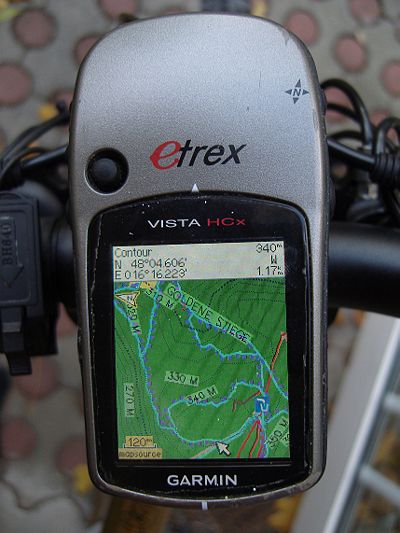
Die Karten sind mit so gut wie allen Garmin Geraeten mit Farbdisplay kompatibel (z.Bsp Legend/Vista HCx and Cx, etrex x0, 6062/76CSx, Oregon, Colorado,Edge 705/800, Dakota, meisten Nuvi, einige Streetmap). Ausnahmen sind aeltere PNA mit Farbdisplay ohne Typfilesupport (einige Ique, einige Zumo?). Auf Garmin Smartwatches mit Farb Display sind die Karten auch kompatibel Allerdings sind die Farben bei den Smartwatches mit 16 Farb Display etwas suboptimal. Auf den 64 Farb Displays sind die Farben ziemlich gut.
Kompatibilität - Standard (Unicode) / nicht Unicode - "Karten können nicht freigeschaltet werden" - bzw "cannot unlock maps"
Einige Karten sind standardmäßig in Unicode - um verschiedene Alphabete in einer Karte anzeigen zu können - also etwa kyrillisch und Latein. Ohne Unicode kann nur kyrillisch oder Latein angezeigt werden (Nicht Unicode Karten). Allerdings hat Garmin im Zuge von einem misratenen Kopierschutz bei GPS Geräten die seit 2016 neu vorgestellt wurden - die Benutzung freier Unicode Karten deaktiviert. Länder in denen nur Latein benutzt wird - gibt es nicht in Unicode - also ist Deutschland immer latin1 (Non Unicode) - die Europakarte gibt es aber in sowohl Unicode als auch Nicht Unicode.
Die Nicht Unicode Version der Europakarte (bzw aller Unicode Karten) wird bei folgenden Garmin GPS Geräten benötigt.:
- Alle Garmin Geräte die erst seit 2016 neu auf dem Markt sind/vorgestellt wurden
- Edge 1000, 820, 520
- Epix
- GPS Maps 64 series
- Etrex 20x / 30x (aber nicht das "Orignal"/bzw alte "etrex 30" oder "etrex 20")
- Etrex Touch 25/35
- Montana 610, 680
- Oregon 700,750
- Ein paar ganz neue Nuvi - sowie ganz ganz alte Garmin GPS Geräte (etwa Garmin Vista C, GPS Maps 60 C)
Dass die neueste Generation einiger Garmin GPS Geräte die Unicode Karten nicht öffnet - liegt an einem Firmwarebug seitens Garmin. Da mit diesem Bug (oder Feature) auch viele unlizensiert ("raubkopierte") Garmin Karten vor Benutzung geschützt werden (wenn auch schon längst wieder geknackt) - ist Garmin derzeit nicht Willens diesen Fehler zu beheben. Es gibt sogar einige legal von Garmin.de bzw Garmin.com gekaufte Karten die auf diesen Geräten nicht mehr geöffnet werden - bisher ohne Lösung seitens Garmin. Warum braucht es aber überhaupt Unicode Karten? Nun die klassichen alten Karten unterstützen nur einen Codepage - also etwa Latein, ODER etwa kyrillisch oder arabisch. Aber nicht alle Schriftsätze zusammen. Dies geht nur mit Unicode. Da in Europa etwa in Griechenland oder Osteurope aber oft kyrillisch geschrieben wird - biete ich die Europakarte nun als Unicode an.
Achtung - es kann nur entweder oder installiert werden. Die Unicode Version überschreibt die Non Unicode Version bzw umgekehrt auch. Nicht Unicode Versionen der Karten gibt es nur dann zum Download - wenn die Standardschrift in einem Land / Region nicht Latein ist.
Alle Non Unicode Karten sind Premium Downloads - benötigen also Registration.
SD-Karten
Hier geht es nicht um die Karten an sich, aber im Allgemeinen akzeptieren Garmin-Geräte, die eine microSD-Kartenslot haben, nur SDHC-Karten - SDXC-Karten funktionieren nicht. Maximal 32GB man muss Sie mit FAT32 (nicht exFAT) formatieren. Sei vorsichtig mit 32-GB-Karten, die sowohl als SDHC- als auch als SDXC-Karten erhältlich sind. 16GB und kleiner sind normalerweise immer SDHC.
Garmin Edge x30 oder neuer
Garmin hat einen komplett verkorksten Hochkontrastmodus eingeführt, der die Farben der Karten verblasst. Deaktiviere entweder den Hochkontrastmodus im Abschnitt "Kartensichtbarkeit". Oder lösche die Datei \Garmin\MapThemes\Mountain.kmtf (manchmal auch \Garmin\MapThemes\Mountains.kmtf genannt). Vor dem löschen evtl ein Backup der Datei machen falls man den Modus wirklich mal haben möchte. Seit der neuesten Firmware im Juli 2021 muss man die kmtf Dateien mit leerem Inhalt ersetzen, oder den klassischen Modus aktivieren.
Einstellungen/Aktivitätsprofile/Wähle das Profil wie Mountainbike/Navigation/Karte bzw Kartendesign: Klassisch
Klassisch: Dies zeigt die OpenMTBMaps / VeloMaps wie vorgesehen an, allerdings werden nun POI aus dem Edge-Profil angezeigt.
Hoher Kontrast: Kompletter Fuckup von Garmin - weil sie nicht in der Lage sind, ihre eigenen Karten überhaupt hochkontrastig zu machen.
Mountainbiken: Komplette Fehlleistung von Garmin - weil sie nicht in der Lage sind, ihre eigenen Karten kontrastreich zu gestalten.
Achtung: Garmin Mapsource kann die Höhenlinien nicht korrekt darstellen.
Qlandkarte GT (seit Version 1.0) www.qlandkarte.org - kein Autorouting. Ist in vielen Linux Distributionen per Packetmanager zu installieren, bzw einfachst kompilierbar. Fuer Windows gibt es einen Installer. Ich empfehle immer die neueste Version zu benutzen. Es gibt regelmaßig deutliche Fortschritte. Der Nachfolger QMapShack ist kompatibel mit den Karten im gmapsupp.img Format.
Android Es gibt eingeschränkten Support mit Oruxmaps (besser als Locus - Anleitung hier: https://gravelmaps.de/android-using-garmin-maps-in-img-format/ )und Locus Maps (die gmapsupp.img Karten nach Locus/mapsVector Verzeichnis schieben (oder Unterordner wie Locus/mapsVector/openmtbmap_de.Img) . Diese Apps können die Karten anzeigen - jedoch nicht routen bzw unterstützen auch keine Suchfunktionen in den Karten. Dazu sollte man die Straßen Namen Labels ausschalten - da diese sonst viel zu oft angezeigt werden. Die reine Kartenansicht funktioniert prinzipiell aber recht gut.
iOS: Keine kompatiblen Apps AFAIK.

Welche Koordianatensysteme werden empfohlen?
Danke für eure Antwort…
Das ist egal, wenn du wirklich noch wo Koordinaten abliest dann Stelle Basecamp auf das System ein.
Hallo,
ich habe die Karten unter Android in Locus Map Classic eingebunden. Die Karten habe ich wie beschrieben mit Mkgmap erstellt. Ich habe verschiedene Layouts probiert, allerdings zwei Probleme mit der Darstellung (siehe Screenshot):
1) Es werden sehr viele Straßennamen angezeigt, auch bei geringem Zoom (z.B. 30km). Laut Beschreibung kann man die Straßennamen Labels ausschalten. Wie? Geht das in Locus Map (habe keine Einstellungsmöglichkeit gefunden) oder bei der mkmap-Erstellung am Rechner?
2) Manche Bereiche auf der Karte werden mit einem rosa/violetten Hintergrund dargestellt.
Vielen Dank!
Andreas
straßennamen labels kann man in Locus abschalten, oder früher konnte man es – ich habe s schon lange nicht mehr genutzt.
2. – keine Ahnung, so noch nicht gesehen.
“Android Limited support exist on Oruxmaps (better than Locus – Instructions here: https://gravelmaps.de/android-using-garmin-maps-in-img-format/ ) and Locus Maps (place the gmapsupp.img maps into Locus/mapsVector directory (or any subdirectory here like Locus/mapsVector/openmtbmap_uk.img) . Note however that those apps can only display the maps. No search or autorouting using the maps is supported. Also you better swtich streetname labels off – as they will clutter the map display. Otherwise displaying the maps works pretty well.”
1. running Android 13 on Pixel devices – the maps loaded fine on Locus, thanks. Based on this comment, I paid for Orux Maps but cannot load the maps. The instructions at the gravelmaps link don’t seem to work & the help link in that page is broken.
2. do you mean switch street name labels off in the app or before transferring the .img file?
Thanks!
2. It does not matter if before or after – it’s just that the streetnames used to clutter up the map because they were far too many , and it did not respect the settings from the .typ files.
1. Maybe it was dropped in recent version(s)? The implementation of Oruxmaps and Locusmaps was more or less identical anyhow. I only tried Locusmaps myself – never Oruxmaps but some years ago they used the same implementation as Locus.
OK, thx for the quick reply. Maybe you’d like to remove the “better than Locus” from the page, since Locus is still free(if ad-supported) & Orux costs – even if only €4. Might save other users wasting their money.
I’ll keep trying with Orux & update here if I fix it.
Keep up the great work, Steve
Please report back if you can get it to work or not – then I will update the guide and cross out Oruxmpas if it’s really not working anymore.
OK, thanks for patience. It’s now working.
The file location has changed in the latest version (9) – it’s now a subdirectory of files – see below.
Orux maps – map download 31/8/2022
Google Pixel 4a, Android 13
Orux maps version 9.0.4, paid (€4)
Corrected URL for manuals: available in Spanish, English, Italian & French. (I’m using the English version)
https://www.oruxmaps.com/cs/en/manual
Map files location
1. Pixel doesn’t have an SD card slot so I’ve skipped the bit about changing the default file location.
2. This is the correct path when the Pixel is plugged into File Explorer on Windows:
This PC\Pixel 4a\Internal shared storage\Android\data\com.orux.oruxmapsDonate\files\oruxmaps\mapfiles
3. Copied the Germany premium gmapsupp.img file (same version as I downloaded for my Garmin eTrex) to this location.
It’s a good idea to rename it, otherwise you just see gmapsupp.img, e.g. to OMTB_Germany
4. Click the update icon (highlighted – see attachment) …. & success!
I added Austria just to check, no problems.
Steve
Can you see any advantage over Locus Maps? I guess they still use the identical vey old never updated map engine?
Visually it’s more appealing – the app looks more up-to-date .. & for €4, you get rid of the ads.
Locus Premium is €10 a year now.
Having loaded the maps, I’m going for a spin .. so will let you know 🙂
First impressions on the move very positive. I’m going to stick with it for a while. I’ll update this thread in a few weeks
Hallo Felix,
ich hatte Deine Karten bisher auf einem Oregon 600 installiert. Dort war die Darstellung prima. Seit zwei Tagen habe ich nun ein Edge 1030+ und dort bei der Installation Clasic ausgewählt. Die Karten werden auch angezeigt, jedoch alle Waldwege nur als ganz dünne Linie und alle in der gleichen Farbe angezeigt, sie lassen sich kaum von Höhenlinien unterscheiden.
Deine Anweisungen bezüglich der Edge Modelle habe ich soweit befolgt, meine ich, oder habe ich etwas übersehen?
Anbei ein Screenshot meiner Darstellung.
Das ist eindeutig nicht mein Layout – also entweder etwas falsch gemacht bezüglich Edge, oder irgendwie gar kein .typfile in Verwendung. Eher ersteres.
Hab die Karten alle nochmal neu installiert, diesmal mit ‚wide‘, jetzt sieht es besser aus. Vielleicht etwas wenig Kontrast, meinst du ich sollte die zweite ‚wide‘ Option probieren?
es sollte ziemlich ident zu Basecamp ausschauen – sonst hast du ein Problem dass das Theme benutzt wird was alles zerstört. Wide bzw Wide Legacy ist nur Unterschied bezüglich Straßenfarben deutsch klassisch vs google maps.
Hier nochmal ein Screenshot wie es jetzt aussieht. In Basecamp ist alles deutlich kräftiger, am Oregon war es auch kräftiger.
Die Muster und Farben müssen am Edge identisch sein bis auf Kontrast. Ansonsten ist das kmtf aktiv. So wie her scheint korrekt. Die einzige echte Ausnahme sind Fenix Uhren, bzw forerunner 945/955 mit 64 Farb Display welches dazu noch extrem vom Blickwinkel/Sonne abhängig ist.
Danke Dir. Wünsch dir noch schöne Pfingsten.
Ok aber ich muss sagen am Computer sieht der screenshot jetzt besser aus als auf meinem Edge. So wäre es perfekt 🙂
Hello,
I would like to use non-unicode maps (for an Oegon 700 I plan to buy) and build the maps on my Linux system since I do not have a Windows computer. Is it possible to compile your non-unicode maps from .exe to .img using https://github.com/btittelbach/openmtbmap_openVeloMap_linux
Can you pass me any example non-unicode map to test it?
Best regards,
Bernhard
The austria map is always non unicode (as are all other maps that are from countries using latin alphabet). But why don’t you just download the gmapsupp.img format maps? You do not need this script then. there is a bash script attached to change the .typ file.
Thanks a lot for your reply, dear extremecarver, telling me that downloads of gmapsupp.img are supported directly.
Tag
Ist das etrex 32x mit den Karten kompatibel? GGfs. unter welchen Bedingungen?
Danke im Voraus und Gruß
ja so wie alle neuen Geräte – halt keine Unicode Karten. Aber es gibt ja alle Länder in Non Unicode. Etrex 30 Touch ist schrottlahm, und Akku auch nicht gut – mein Oregon 600 läuft deutlich länger trotz größerem Display. Keine Ahnung wie das 32x ist – aber die etrex Reihe war in den letzten Jahren eher nicht zu empfehlen.
Thanks a lot for your reply, dear extremecarver, telling me that downloads of gmapsupp.img are supported directly.
Sorry, I posted the comment above in the wrong thread
you should also be able to use Basecamp/MapInstall via WineHD if you wanna use the maps on desktop. Alternatively the gmapsupp.img downloads in Qmapshack (but I cannot offer maps >4GB as gmapsupp.img download – as garmin GPS devices use FAT32). Meaning no possibility to use europe or asia continent map that way.
Qmapshack is my preferred application; I never used Basecamp.
Do you know why Qmapshack local routing (with intstalled database) does not like some tracks and drives around even if I put some routing points on them. Even in pedestrian routing mode. Looks to me like a bug; do you know how to work around?
I thought qmapshack is only using routing via online service, Are you sure it can route with garmin maps? Is there any routing on the legend map (cause that would not work online, that is fictious data).
In my Linux Qmapshack application the is a menu item “Werkzeug”->”Routino Datenbank erstellen”. Having installed that you can interactively route. I think it does not base on routing of the .img used since you have to download extra OSM data from http://download.geofabrik.de/
You *must* try it, because it is able to route distances of many kilometers in fractions of a second. Sou you even experience routing while you move a waypoint with the mouse.
yes that has nothing to do with my maps. Actually that garmin is routing so slow – is anyhow strange. GPSMapedit can route super speedy with fantastic results. Garmin is just using a really bad algorythm.
gpsmapedit routes on garmin maps (limited to the size of map you can load in gpsmapedit). It’s the only non garmin program routing on garmin maps to my knowledge.
Hallo,
gibt es hier irgendwo Empfehlungen zu den Navis?
Ich finde den edge explore interessant, da er für mich das notwendige hat und einen großen Bildschirm bei günstigem Preis. Die Kopplung it Kommot finde ich auch sehr angenehm.
Allerdings steht im Produktvergleich:
Möglichkeit, Karten hinzuzufügen – kein Haken
Kann ich auf dem Gerät mtbmaps und VeloMaps installieren und zum Routen nutzen?
Grüße
Bernd
Edge Explore ist kein Problem – ist quasi ein um viele Trainingsfunktionen gestutztes Edge 1030. Wenn dir die Batterlaufzeit ausreicht – dann ist er gut. Sonst am besten Oregon 7xx Serie. Die aktuellen etrex sind nicht so sehr gelungen.
Ich habe jetzt den Edge Explore, der erste Versuch war eine Enttäuschung. Ich habe alle Karten bis auf mtbmaps deaktiviert.
Meine Einstellungen: Routing-Modus: Mountainbiken, Berechnungsmethode: Distanz minimieren, Vermeidung: Nur Mautstraßen.
Automatisch erstellte Rundtouren ca.40km: Es wird viel entlang der Straße geroutet und die schönen kleinen Wege, die ich nehmen würde, werden nicht genutzt.
Ich habe dann mit BaseCamp versucht eine Route zu erstellen. Das war noch schlimmer. Hier wurden fast nur Straßen verwendet und ich musste direkt auf die Waldwege zwingen. Dabei hatte ich alle Einstellungen wie hier empfohlen gemacht.
Früher hat das Mal gut funktioniert und ich habe schöne Trails und Waldwege vorgeschlagen bekommen.
Unter Basecamp dirt Bike geht eigentlich ganz gut – Oder geht das auch nicht mehr gut. Garmin ändert da leider ständig irgendwas rum – und es wird nicht besser sondern nur schlechter.
Generell – zu große distanzen von einem Punkt zum nächsten sind nachteilig…
Hello
Could you tell me if the GARMIN Montana 610 and 680 GPS are compatible with the old .IMG cards
thank you for your reply
Rene66
what do you mean with old .img cards? The montana is only compatible with non-unicode maps – but yes you can download all the non-unicode gmapsupp.img maps, un-extract them, and use them straight away on Montana.
Hi, how can I make maps compatible with Twonav’s Land software?
You can’t. For twonav you can only use their own twonav vector maps – or raster/image maps from scanned sources and so on. TwoNav and vector maps is pretty problematic. They are strong when it comes to various for of raster (“scanned”) maps.
I downloaded the US West group and during install I receive a warning from Webroot regarding a Trojan in the Change Layout execution file. The map still installs in Base Camp, but I cannot change the layout. I cannot install again as Webroot removes the execution file from the computer. If I completely download the map package again, I can install it and use the maps again, but receive the same warning before Webroot deletes the execution file. I’ve attached a screen shot of the warning in the scan log.
well false positive. The change layout tool needs to write into the Windows registry – likely the antivirus doesn’t like it. Check the change_layout for my digital signature. If the signature is okay – the .exe is fine. If signature is missing – tell me. Very rarely the signature is not created because of missing connection 5 times. Then the antivirus would be kinda in the right (still wrong but okay to assume so).
Thank you for the quick reply! Looks like signature is there and valid through 07/21/2022. I was able to go into Webroot and allow it to install. Once I did that, all is good and I can change the layout with the execution file now.
Hallo, wegen OS Upgrade werde ich gezwungen BaseCamp auf 4.8.6 zu updaten. Compatibility??
Danke!! Martin
die aktuellen Versionen sind okay. Kein Problem mit dem Upgrade. Unbenutzbar wegen kaputten MapInstall waren am Mac nur die 4.7.x Versionen (bzw 4.7.1 unter Windows)
Das BaseCamp Upgrade 4.8.11 am iMac macOS 11.1 durchgeführt – die neue Vers. hat das BackUp der älteren Version nicht genommen. Alle gefahrene Tracks von Sept. 2019 waren verloren. No chance! Die “legacy” Vers. 4.7 lässt sich nicht installieren.
Eine Lösung, die nicht jeder machen kann: aus dem Keller einen älteren Mac geholt (macOS 10.11.6), BaseCamp 4.6.3 installiert, mit der BackUp Datei gefuttert, alles wieder da. Jetzt werde ich meine Tracks als GPX auf ein memory stick sichern und in das neue BaseCamp importieren.
du hättest nicht das Backup gebraucht – sondern einfach nur den Inhalt vom Speicherort in den Speicherort von 4.8 rüberschieben. Evtl zuerst die 4.8.0 downloaden und installieren – und von der Weg dann das Upgrade auf 4.8.11 machen. Ich glaube am Format hat sich nichts geändert – es wurde einfach nur der Speicherort der Datenbank geändert. Aber ich mag mich täuschen. Bei 4.7 war es auf jeden Fall so. Ob es für 4.8 dann Änderungen gab weiß ich nicht. 4.6 auf 4.8.0 mit Speicherort ändern ging auf jeden Fall AFAIK
Ich werde, fürs Wandern/MTB demnächst auf ein Outdoor-Smartphone (Android) umsteigen.
In welchen Apps sind Deine Karten nutzbar?
Es geht mir nicht um eine vollständige Routing-Funktion, sondern wandern/MTB-fahren nach “Sicht”.
Welche Kartenform wären dann nutzbar? Ich nehme an alle, außer die Premium, da die ja, wenn ich das richtig verstanden habe, direkt für Garmin vorgesehen sind.
Danke vorab!
Gruß
Bernd
Ganz eingeschränkt mit Locusmaps/Oruxmaps (Anzeige von gmapsupp.img ohne Straßennamen Labels). Im Prinzip macht es aber wenig Sinn. Karten gehen alle – eben mit den Einschränkungen.
Hallo,
ich interessiere mich für das Garmin Montana 700. Sind deine Karten mit diesem Gerät kompatibel?
Vielen Dank!
Andreas
Ja (die Non Unicode Verion der Karten – Unicode Versionen gehen nicht).