Install Garmin Basecamp:
Just follow the guides Garmin has on their own homepage. Garmin Basecamp is the best program to use the OpenMTBMaps and VeloMaps. Attention - version 4.7.0 is heavily bugged - Since Version 4..7.3 Basecamp is working fine again (but you can stay on 4.6.x if you like).
Best download the current Garmin Basecamp version from Garmin - I have attached here some older working versions should Garmin introduce some bugs to newer versions again.
You can download Garmin Basecamp from here: Garmin: BaseCamp Updates & Downloads
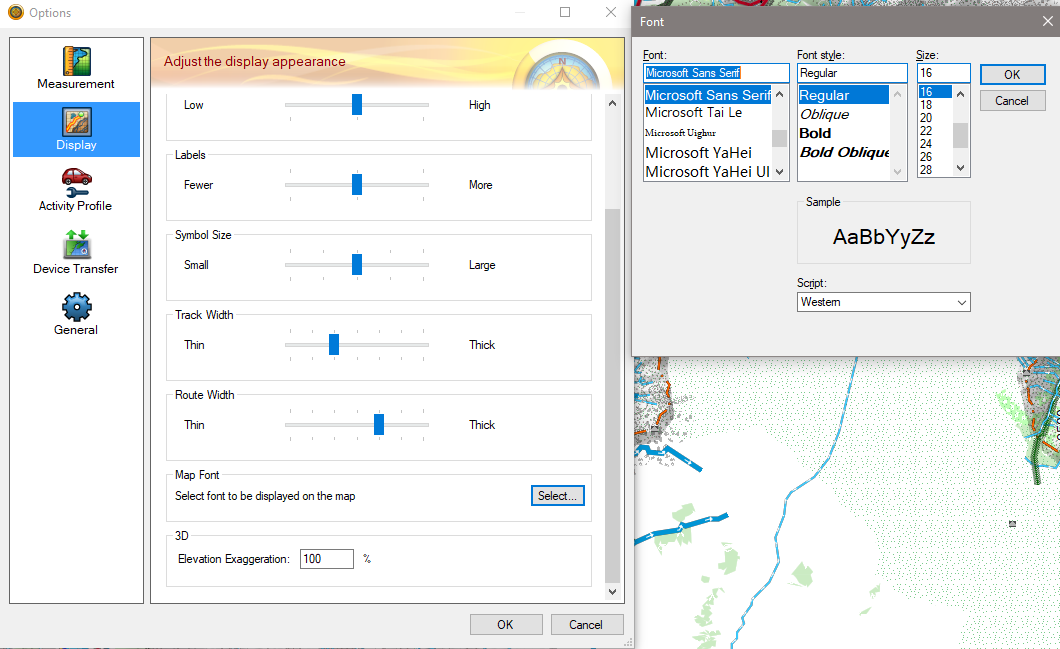
After Installing Basecamp - on most modern PCs/Laptops you will want to increase the Font Size (the higher DPI your monitor - the more. Default is 10 points - I use 16 on my WQHD 16" laptop, and 18 on a 27" UHD monitor.
Why to not use Garmin Mapsource anymore!
Attention - I do not recommend to use Mapsource anymore except for sending maps to older generation devices!
Some reasons:
a) It's not developed anymore since 2010
b) It does not show OpenMTBMap or VeloMap contourlines! (it will send them though to your device)
c) It has no proper database to store tracks or routes - yes undertanding the concept of the database in Basecamp is not easy - but once you got it, it is pretty well done!
So why would you still use Mapsource?
Well to send maps to older generation devices like Vista HCx or GPSMaps 60CSx or even older. Basically to all devices that only support a single gmapsupp.img file! The advantage is that with Mapsource you can select the region on fullscreen - instead of the small popup screen of Basecamp/MapInstaller. Also it will display you a list of all selected tiles - this can be useful for debugging (though normal users don't need this).
Another reason would be that Garmin Mapsource has a search function that is identical to your GPS Device. The search function is actually much better than the Basecamp search function - but for general use I don't think that makes it worth-wile to stick to Mapsource.
So just install Garmin Basecamp instead:
For Reference only - Install Mapsource without owning an old Garmin Device
There are several programs to display OpenMTBMaps on your PC/notebook. The most popular is still Garmin Mapsource - even though it is superseeded by Garmin Basecamp and also Qlandkarte GT is on the way to overtake it. Garmin Mapsource is not develloped anymore, but version 6.16.3 runs still pretty well and has no big bugs. There is a catch however. Garmin only provides updates, no actual installation packages. Therfore below I describe two ways how you can install Mapsource legally nevertheless.
People who have bought a Garmin GPS will have a CD shipped with it including Mapsource. I recommend to use the most uptodate version by Garmin (as of writing this is 6.16.3)
Earlier versions of Mapsource (also 6.13.6) are now incompatible with the OpenMTBMaps as they do not show all ways and streets!!!! Use at least 6.16.1 or higher. Note that while Basecamp shows contourlines, Garmin Mapsource doesn't. Hence for general use I recommend Garmin Basecamp instead.
Classic Way of Installation without already having Mapsource installed (please install everything as administrator)
- 1. Install Garmin Basecamp. This is also a great tool for viewing maps, or planning routes and tracks.
- 2. Download and Install at least two OpenMTBMaps (from OpenMTBMap.org/download )
- 3. Download and install MapSource 6.16.3 from here: http://www8.garmin.com/support/download_details.jsp?id=209
- Note Mapsource will only install if you have done 1. and 2. before. It is essential that you first install two maps AND Garmin Basecamp - else you have to do the advanced way of installation below
I recommend installing a second map (good idea is to install the map legend so you can get to know the layout!!!) because you need to have two maps installed before the map selector shows up. Essentially 1 map would be enough also.
Advanced Way of Installation without already having Mapsource installed
- First install at least one OpenMTBMap (just run the .exe)
- Attention, Mapsource will not install correctly until you have a at least one map installed. So if you forgot step 1, do it now! Go to https://openmtbmap.org/download/ and download the map(s) of your choice and install at least one map!
- Download latest MapSource from Garmin ( http://www8.garmin.com/support/download_details.jsp?id=209 ).
- Unpack or extract the content of setup_MapSource.exe using 7zip (www.7zip.org), WinRAR or another good unpacker.
- From the extracted files, first run MAIN.msi.
- Then, run Setup.exe. Note: The sequence to execute Main.msi and then Setup.exe is important to avoid “Previous MapSource not found!” error.
- Garmin MapSource is now installed. I recommend installing a second map (good idea is to install the map legend so you can get to know the layout!!!) because you need to have two maps installed before the map selector shows up.
Note I still recommend to install Garmin Basecamp nevertheless: Get it here: http://www.garmin.com/garmin/cms/us/onthetrail/basecamp
Attention Mapsource 6.13 6.14 and 6.15 Users:
Please update to at least 6.16.1 -- earlier Mapsource versions miss a lot of ways and streets and make the maps unusable.
Parallel installation of several Mapsource versions:
Simply unpack a mapsource update (see links above), run MAIN.msi and then rename mapsource.exe to something else. e.g. mapsource_6.13.6.exe and then copy it into your main Garmin Mapsource installation folder (usually c:/garmin). Now you can decide which of the two versions you want to use.


Ich bin mal wieder auf den MapInstall Defekt hereingefallen !!.
Wie kann man festellen welche Version von MapInstall instaliert ist ?.
Ich kann da keinen Knopf finden der die Version anzeigt.
Installation einer alten Version (4.0.4) hat aber geholfen.
Die neueste Version funktioniert einwandfrei.
I lost my mail to you. I repeat: I downloaded Basecamp 4.7.5, I see there maps I download some time ago. I have a Oregon 600 garmin device. How can I get the maps from Norway, Sweden,Finland into basecanp and then to my garmin device ? I feel quite stupid not to be able to send you relevant information about the help I need to do that.
Fred
you run the .exe files for those countries (or alternatively the europe map) to install these countries. Norway requires additional download of the .7z contourlines – the installer will ask for them (for Europe continemt map too).
description with pictures here:
if you have still questions read through here:
After many Years , forgotten how I used it before, I must learn from the beginning. I downloaded Garmin basecamp again. And now I think I must try to get the maps/ Karte of scandinavia ( norway, sweden, Finland: for my 3 month trip) via basecamp on my garmindevice. But I got stuck here. Can you help me further, maybe by guiding me through your explanation ? I’m sorry to ask you this, its not only leasiness, I am 77 and everything digital was always difficult for me.
Thanks for your time
Fred
Are the maps already visible in Basecamp? Then you can send them with mapinstall.
Hi,
habe Basecamp installiert, wie bekomme ich jetzt die OpenMTBMaps da rein?
Unter Windows? Indem du die Karten als exe (windows downloads) herunterlädst und dann installierst. Unter Mac OSx ist es im Mac OSx Tutorial erklärt (gmap Karten)
Unter windows
Hier die Karte herunterladen und den Installer ausführen: https://openmtbmap.org/de/download/odbl/
Habe es gefunden, danke.
Die Legende dazu stelle ich wo ein?
Ich vermute die grünen Linien mit den kleinen schwarzen Quadraten sind die Singletrails in dem Abschnitt ?
Ja: https://openmtbmap.org/de/about-2/map-legend/
Danke!
Wie kann man dir Infos zukommen lassen über neue Trails z.b.?
GPX Daten senden
Nicht an mich senden- du kannst sie selber auf osm.org hinzufügen – siehe hier:
I am a bit confused, you mention basecamp 4.8 but the latest version available from Garmin’s download page is 4.7.4!?
Oh yeah – got confused with the OSx version which is 4.8.12 – the windows version from 4.7.3 onwards are fine again. 4.7.1 and 4.7.2 were a mess.